

Funny how things work out sometimes.
Just last week I sent out a special “keep your money” email, in which I told my subscribers the reason I thought they should stay away from Pop-Up Domination.
And by the way, it didn’t have anything to do with the “are pop-ups good or bad for your site” debate.
So the minute I sent out the email, I got an email from my friend Alex Whalley from AlexWhalley.com telling me about this new cool subscription plugin he heard of, WPSubscribers.
Just as I asked him how he liked it and if it really worked, I got an email from the plugin creator asking me to take a look at it and let them know what I thought.
Since I’ve used and loved MaxBlogPress Subscribers Magnet on this blog for a long time, I was skeptical of this new kid on the block, but also excited to see what the new plugin had to offer.
Well…
I couldn’t believe my eyes, to be quite honest with you.
WPSubscribers ROCKS!
Before I get too overwhelmed, let me tell you about my favorite parts - the kind of stuff that makes this plugin revolutionary in its class.
WPSubscribers Price
Yes, I am starting off with the price because it’s one of the current internet marketing wonders - only $47.
Compare MaxBlogPress Subscribers’ Magnet, which I’ve been very fond of and recommended up until now, at whooping $147.
Also, Pop-Up Domination, which does one thing and one thing alone, is $47 at the moment - 80% off their regular price.
Facebook Connect
You know how cautious we all are when it comes down to giving away our personal information, like name and email?
But what if we don’t have to? What if we saw a way to subscribe to someone’s list without having to physically add our data?
Would we be more apt to do it? I’d say, emphatically YES.
What if you, the blogger, can have your very own Facebook Connect button placed wherever you’d like on your blog letting your potential subscribers know that all they need to do to connect with you is press that button like you see in my sidebar, just below my social media buttons?
No exchange of personal information of any kind. Whatsoever.
However, that button is connected to your Aweber account and will let your visitors know that they will receive an occasional email from you as well.
It looks like this:
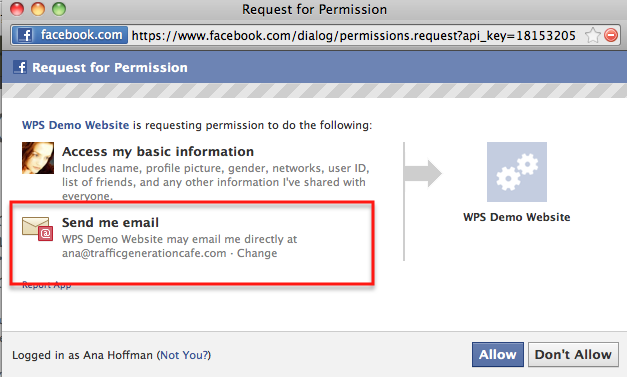
Nothing sneaky about it; it’s all spelled out right there. Plus, my new subscribers will get a confirmation email from Aweber, so they will have to activate their subscription.
I personally love this feature.
One Plugin Does it All
Well, that never happened before. Usually, you need several of them to cover all the basis, like placing forms anywhere on your blog, regular pop-ups, exit pop-ups, footer pop-ups… My head is spinning just thinking about it.
Not so with WPSubscribers.
It literally lets you add ANY KIND of opt-in for ANYWHERE on your site.
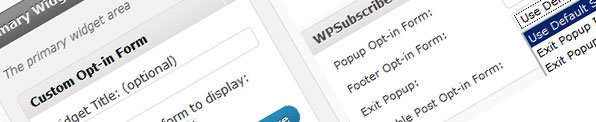
So now you can very efficiently and effectively segment all your potential subscribers into several different lists according to their interests.
Why would you want to do that?
To serve your list a whole lot better and to make more money.
If you are serving your lists the kind of content you KNOW they are interested in, it makes your marketing job a whole lot easier.
Since this is not a post about subscriber segmentation, let me give you a great source for that - this particular post is a part 1 of 3 of an eye-opening series I recently read on Entrepreneurs-Journey.com.
Subscribe on Registration
It’s a rarity to find a blogger who has never heard of CommentLuv plugin. Most blogs I read on a regular basis have it installed as well as I do.
What you might not yet know though is that in the newest premium version of CommentLuv, your readers will be given an option to register on your site to have a choice of their last 10 posts to link to instead of just your last one as it was up until now.
By the way, I have the new version up and running on my blog, so when you go to leave a comment you’ll see the dropdown box that will let you choose your desired post - whether you are linking to your home page or any post page in your “URL” box.
What does it have to do with WPSubscibers plugin?
Well, the new CommentLuv version will give each blog owner the flexibility to allow their commentators to choose from their last 10 posts, not to allow it at all, or to allow it AFTER the commentator REGISTERS on your site.
Sounded like a great feature. The only problem I saw with it was the fact that it sounded a bit useless since I couldn’t find any use for the potential flood of the new registrants.
Now with WPSubscribers and its ability to add the new users to your list - with their permission, of course, it all makes sense.
Build-In “Refer a Friend” Feature

Leverage.
The more hands-off ways we find to build up our businesses without our direct involvement, the better off we will be.
That’s exactly what this list building feature allows: it lets you leverage your new subscribers by giving them incentives to let their friends know about your list and invite them to join as well.
Hands-off email list building…
I like that.
Other Important Features at a Glance
- Automatically fills out the forms with your visitor’s name and email address, so that all they have to do is press Enter to join your community - powerful psychological trigger;
- Subscription form on hidden content: allows you to provide special valuable content for your subscribers’ eyes only. Builds up value and exclusivity.
- Subscribe on user commenting: allows you to have a check box by the comment area for your commentators to conveniently subscribe to your list while leaving a comment. Since commenting requires their name and email address, adding them to your list is a breeze at this point.
- Subscription analytics: not the kind of analytics you need a degree to understand, but an easy way for you to see which forms are performing well and which ones need to be scraped. Great for split testing.
- Create as many forms as you like; design them as you like; place them wherever you like.
Marketing Takeaway
Needless to say, I am a WPSubscribers gal through and through now.
And after seeing what this plugin will do for you and your business, you’ll catch the bug too.
Check it out here:
==>https://trafficgenerationcafe.online/loves/wpsubscribers
Thumbs up or down? Comment to show me that you’re alive!
Tony Nguyen says
Hi Ana,
I’m not sure about the purpose of this review, you are currently using maxblogpress subscribers magnet and you are recommending Wpsubscribers to your blog readers? Am I missing any points in your review?
Thanks,
I’ve been switching between the two to see which one I like better, Tony, and it’s definitely WPSubscribers. On my list to switch back to it. 😉
Jeff Witt says
Ana,
Installed the plug in last night and played a little. Seems like a good value at $47.
I suppose now I need to write a couple PDF papers as value to give away in exchange for their email address. Any tips on writing such a paper?
I think I’m really going to like the ability to put different offers on different pages/categories.
The easiest way to do it is to repurpose your existing content. Transcribe videos or audios; put blog posts in book format, etc.
Adam says
But Ana by doing so, wouldn’t it frustrate the subscribers knowing that all they get in return is a copy of previous blog posts(which they’ve read) just in a different format (ebook/audio/video etc) ??
I never said “send it to your list”, Adam.
Adam says
When I use the word “subscribers” I don’t mean the existing subscribers in the list. In Jeff’s case, I mean his existing blog readers/followers. They’ve read all of Jeff’s post and if Jeff were to introduce optin box to giveaway his free (repurposed-content)ebook, I’m sure his blog readers/followers will notice.
I see what you mean, Adam.
Actually, you’d be surprised at how many bloggers make ebooks out of their content and their readers, knowing that it’s the same content you can read on the blog for free, still buy them.
I agree with you; any ebook, including a free giveaway, should be a unique piece of content.
Hi Ana,
Thank you for the great resource and if there is anyone I trust for a recommendation it is you.
I am excited to give it a try and start building a list
You Rock!!
Jeff
That’s great to hear, Jeff. Thank you.
Chris says
Thank you for the review Ana. Based on that I’m planning to purchase. I saw some debate in your comments above about whether there is a concern for people to opt in through Facebook Connect. So with that feature, it populates the email address that the user has registered with their Facebook account, right? Thanks!
That’s exactly correct, Chris.
I am still fine with it entirely; I use double opt-in as well and anyone who doesn’t want to get on my list simply ignores my “please confirm” email.
Natalie@Travel Blog says
Sounds great but at 47 USD it is a little out of my budget at the moment. Would like to know from other bloggers across different niches what the success rate is as well.
It sure is worthwhile, so when you are able to get it, you should do so.
This sounds exciting, Ana! I will check it out.
Thanks for sharing.
Mavis
My pleasure, Mavis!
Thanks for this thorough review, Ana.
I can definitely see the power of this new plugin and how it surpasses even Subscriber Magnet (oops, I just paid for it, darn!)
Will look to pick up this valuable plugin in short order, and I guess put Magnet in mothballs. 🙁
Oh well… thanks for the information Ana!
It’s my pleasure. Sorry to hear that you just paid for SM, but I know you’ll love this. 🙂
lol … no worries, mate. My point wasn’t the general Facebook population, but the more internet savvy users who also read and comment on blogs. My guess is that the security issues have had little impact on these people.
I think you probably know where I fall on the whole popup debate by now, Ana. Still, for those who are open to using popups, this seems like a no-brainer. When it comes backed by people like you and Alex then I know it’s of high quality.
One problem I have isn’t with the plugin itself, but with the Facebook authorization language. It sounds so ominous with everything someone is granting your site access to - especially when you won’t be accessing any of it. Do you foresee losing potential subscribers who are fearful of the always hyped Facebook privacy concerns?
To be quite honest with you, Brad, I think people see the security measures more as an inconvenience than an actual threat. My subscriber list is growing beyond my expectations and if I am losing any, I don’t notice it. Hope that answers you. 🙂
Pritam @ RamSurvey says
I have earlier installed PopUp domination on one of my blog and suddenly I found the the decline in the subscriber count. Moreover the stand alone version was not working even after trying very hard. So I was totally unstatisfied and I went for money back from Clickback and with in 24 hrs I received this. Thanks to Clickbank for their great service.
You have mentione so many of your good experiences like I read in FamousBlogger site for PopUp Domination. Is this really useful and have money back guarantee in case I am not satisfied.
I know of many bloggers who love Pop-Up Domination, Pritam, but in my opinion, it’s largely overused - all the pop-ups look the same and they pop-up at the worst possible time, when you just get to the blog and start looking at the content.
Having a good customer service always helps though.
I am sure you’ll find the same with WPSubscribers, should you not like it as much as I do.
Ana
Yes, Wayne, this is a game changer indeed. Thanks for supporting my link 🙂 and thanks for stopping by.
You must’ve missed the RSS email, no? 🙂
heads up, your pop up appears every minute or so, something you can stop in the settings.
Thanks for the heads-up, Alex - newbie mistake I am sure. 🙂
Will have Jenni take a look; see where I messed up.
Second everything you said.
This plugin is incredible on so many levels!
I’ve already started building an entirely new list focused on link building - from the same blog! (and you would never know it!)
Brilliant stuff Jenni, nice review Ana
Definitely good stuff, Alex…
I am still pondering as to how to use it to the fullest on my blog.
Ana,
I am already using this plugin since a week ago and I am really amazed by the features - given its price. I have still not yet used all of the features but so far it i too good to handle. the stuff were so easy to initialize. And I simply love the anywhere optin; that a literal promise.
Cheers,
Jane.
It offers A LOT indeed, Jane - I look forward to finding some time to just sit down and implement. Even a few strategy will make a difference; I am sure of it.
Sarah Arrow says
Thanks Ana, I am going to give it a go. Not quite sure what I am going to do with it just yet, but I will be doing something.
You can start with adding some opt-in forms, Sarah. More forms, more chances for people to opt in, bigger list, more opportunities to build relationships, more potential income.
Can’t go wrong with that!
Have a great day.
Sarah Arrow says
Have got it and started to add in opt in forms… I think I will go down the Facebook Connect route with the opportunity to email the person. It’s a little tricky for me to configure (have average tech skills) but it will get done 🙂
I know what you mean about being low on tech skills, Sarah - I am the same way. Seems like takes me twice as long to figure something out, but in some cases it’s worth the work!