
We are all aware that linking to bad neighborhoods is… well, bad.
However, it might come as a surprise to you that you might actually be linking to such neighborhoods from your blog right now.
What defines a bad linking neighborhood?
Since Google is not providing us with any decent definition of what it constitutes as a bad neighborhood, just tells us not to link to them, I took the liberty of coming up with my own.
“Bad neighborhood” sites are those sites that try to game the search engine ranking system and typically don’t offer any quality content.
Your typical bad neighborhood sites include:
- sites with multiple pop-up ads;
- link farms;
- safelists;
- pay per surf offers;
- blogs that scrape content from other blogs;
- sites with largely duplicate content;
- may more.
Do you link to bad neighborhoods?
What prompted me to write this article was a great tool I stumbled upon when doing research on my previous post on WordPress security.
This tool will scan the links on your site and flag any possible problem areas that might be indicative of bad neighborhoods.
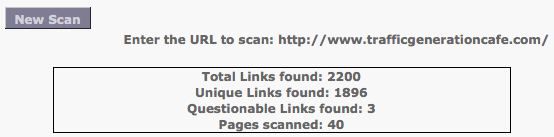
Is it perfect?
No.
However, it’s free and it will definitely discover any questionable links on your site, like it did on mine.
For instance, I realized that one of my long-time commentators was sneaking in some affiliate links as their website URL.
It’s not exactly a “bad neighborhood”, but why would I link to a product page of sorts, especially when I am an affiliate with that company myself?
Oh, yeah… the link to the tool before I forget:
==>http://www.bad-neighborhood.com/text-link-tool.htm
Another good reason to periodically scan your site for questionable links is the fact that some sites simply go sour at some point.
For instance, how would you know if one of the sites you linked to in the past and it appeared “healthy” back then was since then penalized by Google?
Exactly my point.
Most Common Bad Neighborhood Links - Trackbacks
Are you trigger-happy to approve trackbacks on your blog?
Better be careful: that’s how most of your bad neighborhood links are sneaking in on your blog.
To learn more, read these posts:
- Trackback Spam Be Gone: What I Use to Cut Down on Junk Trackbacks
- WordPress Trackbacks & Pingbacks: How to Use Them For SEO & Traffic
Marketing Takeaway
Take the few seconds that it takes to scan your site to make sure you are staying on the right side of Google.
==>http://www.bad-neighborhood.com/text-link-tool.htm
Love it or hate it? Comment to show me that you’re alive!
Thanks for the heads up about the bad neighborhood tool, Ana. Does it check your whole site if you add your homepage or do you have to do it page by page? I just wonder if Google views our links in the same light, as this tool picks up a link I have to cancer.gov as a bad neigborhood!
It will scan some/most pages on your site, Rika, just by adding your home URL.
I think this tool just points out suspicious links; doesn’t mean that those links are actual bad neighborhood links.
That’s why we’ve got a head on our shoulders and that tool doesn’t. lol
Lol. Yes, Ana, right on. That’s why we’ve got a head! Thanks for your response. Loved it.
Hi Ana, I just ran a scan. Out of 3999 links, only 10 were considered questionable. Interestingly, these were all Amazon links! (I’m an affiliate.) The links are for foreign Amazon sites. Figure there must be something weird looking about them, but I’m relieved that these are probably not genuinely bad neighborhoods. Just FYI, I also link to your site so relieved that it did not show up as a bad neighborhood. 🙂
LOL, Astro - that IS good news.
One of the links from my blog recently showed up as “bad” because it mentioned the word “sex” in the title of the post.
Ana, I just ran it again today and Bad Neighborhood freaked because Amazon had a product with “sex” in the description. Sheesh.
Hey, the main reason I’m commenting: your link to Jane Sheeba’s article on G+ is returning a 404. This is just the sort of thing that shows up on Bad Neighborhood. BTW - I needed to check a suspicious comment link and came back to this article to get the link to BN. I’m using your site as reference library. 🙂
I’ll have to start charging you a toll, my friend…
Which post was it; do you remember?
Yes, it is this post, Ana. Last line, after the P.S.
Toll sounds reasonable. 🙂
Thanks - got it out.
Ana thanks for the great advice and link exchange tool. Very easy to use and provides useful information. Glad I read this post!
You’re welcome, David.
I found your site through GrowMap who suggested I follow you on Twitter - which I did. I’ve just started reading through your articles and so far I’m loving everything. I love the pictures to go with the posts too! 😀 I’m definitely a newbie when it comes to all of this. My site checked out clean but that could be because I just don’t have anything to check. HA.
LOL! Welcome, Dawn. I’m glad you’re enjoying my blog.
Hi Ana,
That sounded like a great tool. I’ve been linking to some sites with “resource pages”. I’m not sure if they qualify as a directory or a link farm page.
I know the feeling of getting so few comments in the beginning, Calli, that you tend to approve many that are borderline.
I never do though. So I suggest that you get rid of any questionable links like that.
I appreciate the education Ana. I have not yet replaced my Virtual Assistant and I am slowly learning about links, SEO, and other topics webmasters are concerned about. I never wanted to hang out in ‘bad neighborhood’; therefore, I will be using the link checker that you suggest right away. I definitely do not want my dismal rankings to be negatively impacted 🙂
You’re welcome, Rachel. You’ll find the checker useful in keeping you away from bad neighborhoods. 🙂
Thanks ever so much for drawing my attention to this ‘bad neighbour’ tool Ana. I never knew that there was such a tool, and I never really thought about how comments could be harming our blog!
Off to do a quick check now 🙂
Total Links found: 2846
Unique Links found: 2449
Questionable Links found: 4
Pages scanned: 40
I have some investigating to do!
Only 4 bad ones (potentially) - not bad for so many links, Christopher!
Hey Ana,
Thanks for this resource. I am heading over to scan my site right now.
Do you use the Simple TrackBack Validation Plugin? I was wondering if this plugin is enough or do I need to do more to validate my links?
Thanks for sharing this Ana and have a great day!
I used to have it, Ian, but it didn’t seem to do much to stop spam trackbacks.
Right now I use “Disable Trackbacks” plugin - the legitimate trackbacks still come through and it does cut down on MOST spam trackbacks, but not all. I still get about 10 spam ones per day.
Haven’t found a perfect solution yet…
I think I am going to switch to the TB plugin you suggested. I don’t get as much TB spam as you do, but my blog still does get it’s fair share.
I am currently learning how to build plugins, maybe a better TrackBack validation plugin should be my first one. Probably a little beyond my abilities right now, but down the road, it won’t be. 🙂
Thanks Ana and as always have a great day!
PS. I agree with Alex “Ana does write awesome shit!!” 😉
Very ambitious, Ian - I like it!
Alex just decided to boost his search engine rankings. 🙂 And thank you.
Thanks for sharing Ana - I know this sounds like a spam comment but that;s all I got. Good points about outbound links and a great free tool for sussing it all out.
Cheers
PS: I LMAO when I saw that I was indeed ranking #1 for Ana writes awesome shit
Reinforcing your rankings, I see? 🙂
Hi Ana,
Very useful tool. I just scanned our Seven Sentence creative blog and it pretty much came up clean which was encouraging!
I will check it periodically from time to time, because I like to live in a nice neighborhood.
Thanks
Geoff
Just goes to show you are doing many things right, Geoff.
I see you are working on a “creative blog” keyword… I wonder how much potential traffic one would potentially get with it - how many people really search for that?
Hey thanks Ana.
I am a little unsure on what level of keyword to aim for. I would like to “own” “creative blogs” as it does represent what Seven Sentences is all about.
Google Keyword says there is 49 500 global monthly searches for “creative blog.” Currently we are number 5 on the front page but we are getting very few page views from that search? Why is this?
How do you decide what keywords (in popularity), your particular site has a chance of securing? I don’t want to aim to high, but I don’t want to aim to low either.
I have been working through your free e-book - it’s awesome.
Thanks
Geoff
Geoff,
I did some looking around and I don’t see your blog on the first page for either “creative blogs” or “creative blog”. Are you sure you are not letting Google personalize your search and add your blog to it because you own it? Take a look at this: https://trafficgenerationcafe.online/search-engine-ranking-tip-incognito-search/; am I barking at the wrong tree? That might explain why you are not actually getting any traffic from it.
The way I determine whether I try to compete for a keyword is:
1. The amount of daily searches - I start at about 30 per day. Now mind you, that’s for the first place; if I am #10, I’ll get only a fraction of it.
2. Competition. You got my report, so you know how I go about determining that.
Ana
Wow… Ana you are correct as usual. I must put my tail between my legs and stop boasting about being on the front page… WHEN I AM NOT. Thanks for the advice as usual…
This is the best SEO site on the internet
Nice post Ana, that’s actually one of the big reasons why I don’t link out a whole lot on my blogs. I get a lot of requests all the time for guest posts and link exchanges but I really strive to make sure my sites are giving quality information (and resources) so having one scammy link can mess up everything. Took a look at the tool, seems everything is good 🙂
(This would be great for comments too, you could do a quick scan of people and make sure that your commentors aren’t sending people to scammy sites).
Yes, that’s an important element too. Although we hope that our commentors will be careful, they may trust blindly as they found it on our sites.
Hi Ana, that’s a handy breakdown but sad to read about a commenter sneaking in affiliate links. It’s that kind of thing that makes people shut down comments altogether which is so sad because then you’ve lost your community. Luckily most of us are good eggs and some of the dodgy ones aren’t even doing it on purpose, they just don’t have a good idea of blog etiquette:)
Those things happen, we must just be vigilant. 🙂
Glad you finally paid me a visit, Rob; thanks to your family!
1. I don’t mind if someone links to their own product on their website - that’s what link building is all about, after all.
But when a commentator tries to link to a third party product that they are trying to promote and earn affiliate commissions from, that’s a no-no.
2. You can’t do anything about other sites linking to you - however questionable they may be. The only thing you can control is who YOU ARE linking to through things like comments and trackbacks.
Ana
Another nice post, Ana.
Checking for dodgy links is something I do every day. Every so often, I have seen one that looks really suspect. I usually follow rule number one ” Don’t hit the link” even though the temptation to know what it is all about is tugging at you. I then do some research(Browsing) to check out the site/ and or / go to forums and other sites who are often discussing similar suspect links showing up on their blogs.
Surprisingly, apart from the occasional(Ultra suspect link) many of the “Sort of suspect” looking links turned out to be fully legit sites.
I know, Daniel - a lot of them turn out legit. 🙂 That’s a good way to check it out, by the way.
Really useful tool. So many of the websites that I linked to have innocuous home pages and articles, but deeper down in the site there was some dubious content that I had no idea about!
Yes, that is often the case. Take care!
Hello Ana,
You have always got the skinny on everything! I bookmarked this site and discovered that I had a few of those bad links, too. I will deal with the obviously bad ones. Thanks for the good information.
Lou
Ah, Lou, you’ll make me get a big head! 🙂
Get rid of those bad links before they cause trouble for you.
Thanks Ana,
Great info - used it to check a site, and I’ll keep using it. Some other interesting tools on that site too.
Dan
P.S. I’m now a Cloudfire guy!
That’s awesome, Dan! Enjoy!
Well said Ana. Linking to a duplicate blog is not a healthy approach to link building no matter how many of such backlinks we get. In order not to raise a Google red flag and jeopardize our years of blogging, let us focus on proven link building like guest posting. Thanks for sharing!
You are very welcome, Michael.
We have to be radical as to what we do and don’t allow, Oliver. You have a great weekend too!
FYI, just tested and the results where great. Did not know that they also scanned sub-domains. That is a big improvement since the last time I used it. Of 3499 links (2852 uniques), only 3 where found. Not bad, considering that the three questionable links where pointing to my own old revresponse sub-domain. Deleted that now, lol. Timely post indeed 🙂
You’re welcome DiTesco. Glad the post came at a good time.
Nothing is easy isn’t it 🙂 Now comes bad neighborhood too… Actually, I have used that tool before and I was surprised, because it tagged “problogger” as questionable link at that time, lol. Got it sorted out and fortunately, no “bad” links where found. Been a while that I have done a check though and now is just a good time as ever.. Thanks for the reminder, off to see if I have been linking to “naughty” websites 🙂
Hopefully you’re not linked to naughty websites now either, DiTesco. Have a good weekend. 🙂
Ana,
Thank you. I will be getting that plugin as soon as I finish my comment.
So you are referring to links that are physically on your site, right? What about the ones that are on other sites that link back to you AND you are not aware of. I assume not all notify you. Do those hurt your site?
~Allie
No, those definitely do not hurt you, Allie - Google understands that you have no control over who’s linking to you.